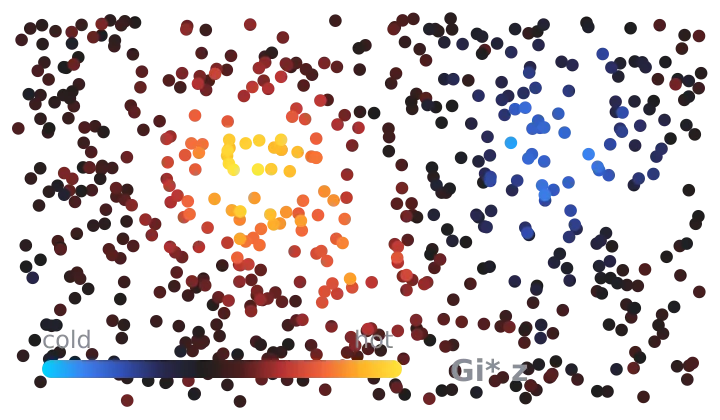
Expression Hotspots (Getis-Ord Gi*)
Where one gene forms clusters of high or low expression.
Verified: passed 9 of 9 gates
v1.1.0
2 downloads

by PointillViz reference tools
Which way a quantity increases across the tissue, as arrows over the section. Gene, cell type or any annotation column — with every arrow that could be noise removed.
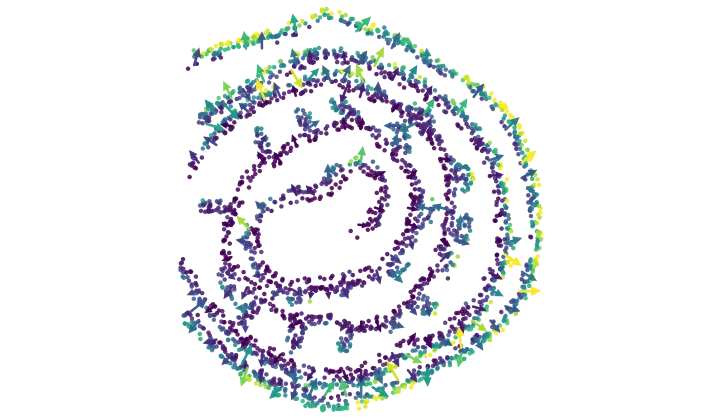
Answers the question: In which direction does a selected quantity increase across the tissue, and how steeply?
The tool converts the selected quantity into a smoothed spatial field. Its gradient reveals the direction and strength of local changes across the tissue. Each cell with a valid measurement receives a value . This is either the selected gene expression, a continuous measurement, or—for a selected population— for cells belonging to that population and for other labelled cells.
At regularly spaced positions across the tissue, the tool calculates a Gaussian-weighted local mean:
The weight decreases with the distance between cell and position , so nearby cells contribute more strongly to than distant cells. For a selected population, represents its smoothed local proportion.
From the spatial variation of this field, the tool calculates its gradient and magnitude:
Map. Cells are colored by the smoothed local value : dark colors indicate lower values and yellow indicates higher values. The arrows show the gradient : their direction indicates the steepest increase, while their length represents the strength of the spatial change. For display, this strength is scaled nonlinearly as , where is the 95th percentile of the displayed gradient magnitudes. Arrow color also represents , not gradient magnitude.
Plot. To distinguish strong gradients from uncertain estimates, the tool calculates the effective cell count , the local variance , and the standard error:
Here, is the centered cell value, and is the spatial width of the Gaussian filter. A small effective cell count or high local variation increases the standard error. The x-axis shows a threshold , while the y-axis shows the proportion of the measurable positions whose standardized gradient magnitude reaches that threshold:
The solid curve shows the observed proportion. The dashed curve shows the frequency of standardized two-dimensional gradients expected from the Rayleigh distribution under random cell values. If the observed curve lies clearly above it, strong spatial gradients occur more often than expected by chance. The line at marks the default threshold below which arrows are hidden when filtering is enabled.
| Parameter | Type | Default | What it does |
|---|---|---|---|
Differentiatesource |
select, 3 options | One level of a categorical column | Selects whether the field represents the local proportion of a population, a continuous measurement, or gene expression. |
Categorical columnfield |
categorical_field | optional | Selects the categorical annotation used to define the populations. Used only when Differentiate is set to category. Defaults to the dataset’s cell-type column. |
Levellevel |
category_value | optional | Selects the population from the chosen categorical column whose local proportion is analyzed. |
Continuous columncolumn |
continuous_field | optional | Selects the continuous measurement to analyze. Used only when Differentiate is set to continuous. |
Genegene |
gene | optional | Selects the gene whose normalized expression is analyzed. Used only when Differentiate is set to gene. Values are normalized to a total of 10,000 counts per cell. |
Smoothing (σ, grid cells)sigma |
float, 0.6–3 | 1.2 | Sets the width of the Gaussian smoothing in grid cells. Larger values produce smoother fields with broader, weaker gradients. |
Grid detaildetail |
float, 0.5–2.5 | 1 | Sets the spatial resolution of the calculation. Higher values capture finer but noisier spatial changes. |
Arrowsarrows |
int, 200–20,000 | 2,000 | Sets the approximate number of arrows displayed. This changes the display density, not the calculated field. |
Hide arrows that are not significantgate |
bool | on | Shows only positions with z ≥ 3 and at least 30 effective cells. Turning it off also displays gradients that may reflect noise. |
The nine gates this version passed when it was published.
Passed 9 of 9 gates
bundle
pass
5 files, 39.0 kB packed and 174.9 kB unpacked, plugin.json at the root.
manifest
pass
vector-field 1.0.0 by PointillViz reference tools; entry tool.py, outputs summary, cells, vectors, series, 180 s and 4096 MB budget.
entry
pass
tool.py imported in 0.20 s and defines run(ds, params).
imports advisory
pass
2 Python files, importing __future__, backend, numpy, vfield_core; no network, subprocess, filesystem-write, dynamic-exec or environment use found.
fixture
pass
ran on the 600-cell fixture in 0.02 s of its 180 s budget, returning summary, cells, vectors, series and 1 log line.
result
pass
returned the declared outputs: summary, cells, vectors, series.
determinism
pass
two runs with identical parameters produced byte-identical results (27.3 kB of JSON).
edge
pass
ran at the minimum corner (arrows=200, detail=0.5, gate=False, sigma=0.6) in 0.02 s; at the maximum corner (arrows=20000, detail=2.5, sigma=3.0, source='continuous') it refused in words rather than crashing: Nothing could be measured. Of 122 grid sites inside the tissue, none were far enough from a tissue edge for the smoothing window to sit entirely on real data, so no gradient at all was computed for cont_cell_area. The grid is too coarse, or σ too large, for a region this size: lower the smoothing, raise the grid detail, or widen the selection. (code: no_measurable_sites).
no_mutation
pass
the fixture dataset's 4 files are byte-identical after every run (plugin_cache/, where ds.knn caches, is excluded by design).
Passed every required gate when this version was published. That is a statement about the gates, not about whether the code is safe to run.
Where one gene forms clusters of high or low expression.
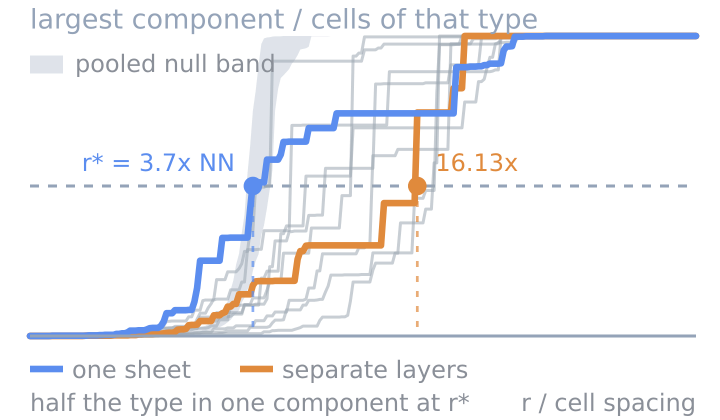
Whether a cell type is one connected mass or many islands.
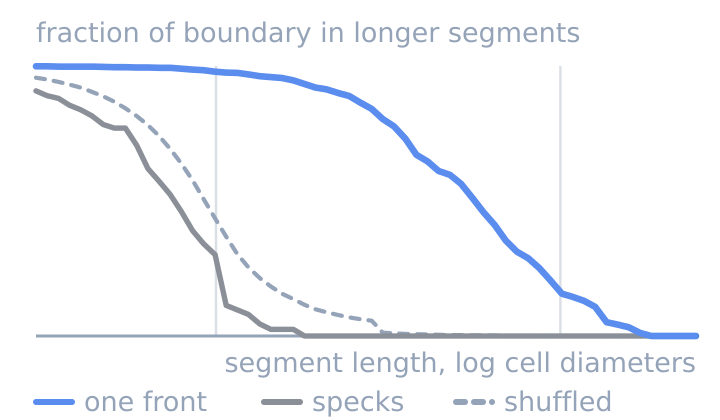
Whether two cell types meet along one front or in specks.