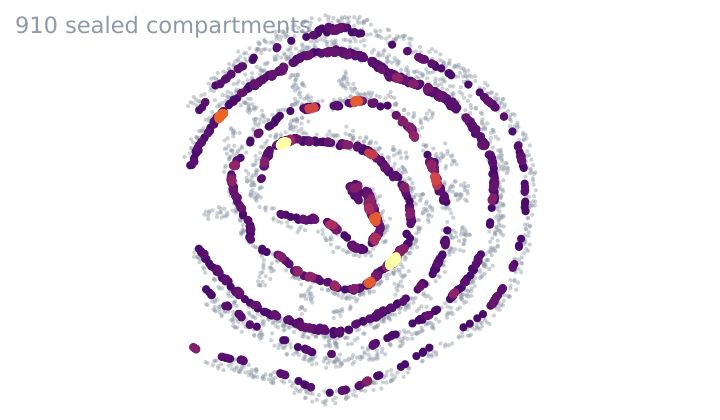
Tissue Permeability
Which cells one cell type seals off from the rest of the tissue.
Verified: passed 9 of 9 gates
v1.0.0
4 downloads

by PointillViz community tools
Whether two cell types meet along one front or in specks.
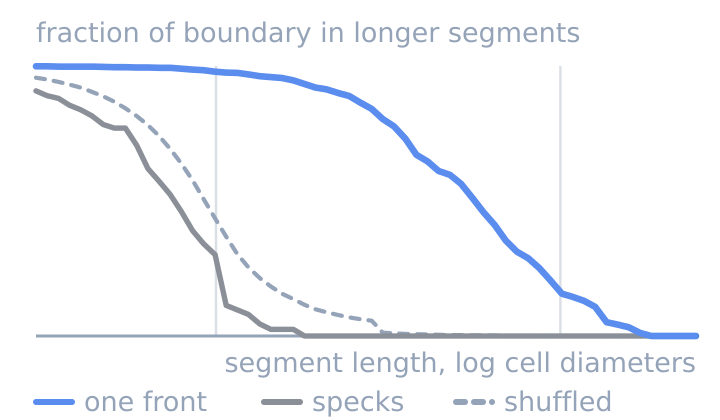
Answers the question: Which group pairs form long, continuous boundaries rather than many short, disconnected contacts?
To identify boundaries between groups, the tool first connects the cells in each section using a Delaunay triangulation. Three cells form such a triangle if a circle can pass through all three centers without enclosing another cell center.
When two connected cells belong to different groups, the tool creates a small boundary piece between them, perpendicular to the line connecting their centers. Touching boundary pieces are combined into one segment when they separate the same two groups.
For each group pair, the tool measures the lengths of its separate boundary segments and summarizes them as:
Because segment length is used as a weight, long connected boundaries contribute more than short contacts. The same value is calculated after repeatedly shuffling the group labels while keeping cell positions fixed. Coherence is then:
0 indicates the shuffled expectation, while +1 indicates an observed value about 2× as large.
Map. Cells along group boundaries are colored by their local coherence value. This is calculated similarly to , but uses the lengths of the specific segments touching the cell instead of the pair-wide observed Lw. Cells on longer, more continuous segments than expected appear yellow, whereas cells on shorter, more fragmented segments appear blue.
Matrix. Both axes list all groups, and each square shows the coherence score defined above for one group pair. Yellow indicates longer, more continuous boundaries than expected overall, while blue indicates shorter, more fragmented boundaries.
Table. Each row describes one group pair and gives the cell count for both groups, along with Coherence length and log2 coherence, which correspond to Lw and defined above. The table also reports Interface length, the total length of all boundary segments; Segments, the number of disconnected segments making up this boundary; and Log2 contact amount, the observed-versus-shuffled comparison based on this total boundary length rather than Lw.
| Parameter | Type | Default | What it does |
|---|---|---|---|
Grouping columnfield |
categorical_field | optional | Which annotation the boundaries are drawn between. Defaults to the cell-type column. |
Minimum reportable interfacemin_interface |
float, 0–1,000 | 50 | Sets the minimum shared boundary required for a group pair to appear in the matrix and table, measured in cell diameters. It does not change the map or the calculated boundaries. |
Edge pruning distanceedge_prune |
float, 1–20 | 3 | Drop Delaunay edges longer than this many median cell spacings, so no boundary is created across a lumen or tissue gap. (The empty-circle criterion used to construct Delaunay triangles does not impose a maximum edge length and could otherwise connect cells across such gaps.) |
Label shufflesn_shuffles |
int, 5–99 | 19 | Sets how many times the group labels are randomly shuffled to create the reference used to score each pair. More shuffles give a more stable comparison but increase runtime. |
Pair member Atype_a |
category_value | optional | First member of the pair drawn in the segment-length curve. It is used only to select the pair shown against the dashed white shuffled-label curve. Defaults to the longest reportable interface. |
Pair member Btype_b |
category_value | optional | Second member of that pair. |
The nine gates this version passed when it was published.
Passed 9 of 9 gates
bundle
pass
4 files, 16.4 kB packed and 44.4 kB unpacked, plugin.json at the root.
manifest
pass
interface-coherence 1.1.0 by PointillViz community tools; entry tool.py, outputs summary, cells, matrix, series, table, 120 s and 2048 MB budget.
entry
pass
tool.py imported in 0.20 s and defines run(ds, params).
imports advisory
pass
1 Python file, importing __future__, backend, numpy, scipy; no network, subprocess, filesystem-write, dynamic-exec or environment use found.
fixture
pass
ran on the 600-cell fixture in 0.41 s of its 120 s budget, returning summary, cells, table, series, matrix and 1 log line.
result
pass
returned the declared outputs: summary, cells, table, series, matrix.
determinism
pass
two runs with identical parameters produced byte-identical results (22.4 kB of JSON).
edge
pass
ran at the minimum corner (edge_prune=1.0, min_interface=0.0, n_shuffles=5) in 0.35 s; at the maximum corner (edge_prune=20.0, min_interface=1000.0, n_shuffles=99) it refused in words rather than crashing: No pair of groups shares at least 1000 cell diameters of boundary. Lower the minimum reportable interface. (code: no_interface).
no_mutation
pass
the fixture dataset's 4 files are byte-identical after every run (plugin_cache/, where ds.knn caches, is excluded by design).
Passed every required gate when this version was published. That is a statement about the gates, not about whether the code is safe to run.
Which cells one cell type seals off from the rest of the tissue.
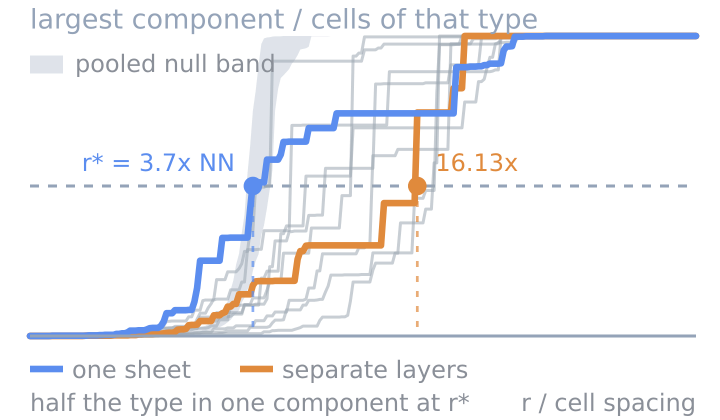
Whether a cell type is one connected mass or many islands.
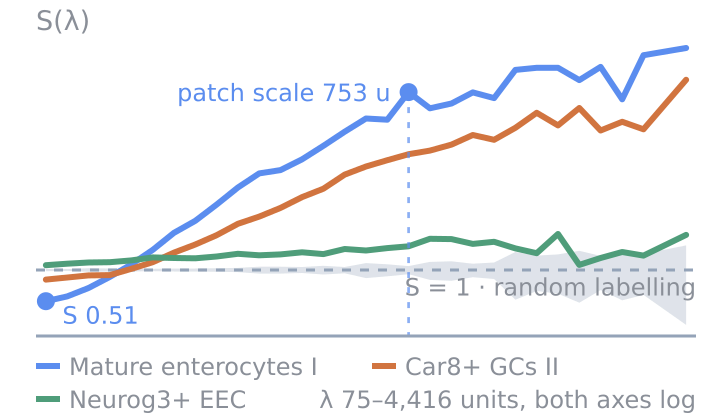
How clustered each cell type is, at every length scale.